

 Compared to an Internet-accessible service such as ChatGPT, local LLMs can appear much more secure. Disconnected from the general public, this technology serves as a digital moat for confidential information and processes.However, most businesses looking into a local LLM are not proposing to train a foundation model from scratch. That approach would require substantial data, specialized talent, computing power, time, and money.Instead, the organization selects an existing open-weight model, hosts it on company-controlled hardware, connects it to approved information, and adds an internal interface, access controls, and monitoring. A project team may then customize the system through prompting, retrieval-augmented generation, or fine-tuning.Today, we dive into this process, discussing how you can successfully implement your own local LLM.
Why Use a Local LLM
Generally, organizations explore local LLM for stronger control over company information. Prompts, retrieved documents, and outputs can remain within infrastructure controlled by the organization. This may be valuable when employees work with proprietary documentation, policies, customer information, financial or operational records, source code, research, or other regulated material.
However, this is not the only benefit. Local deployment can also give the organization more control over the model version, upgrades, retention, logging, network access, retrieval sources, hardware allocation, and availability during internet outages. This may help manufacturing sites, field operations, research facilities, or other restricted environments.
A local LLM may also offer cost benefits when usage is high and predictable. However, leaders must compare API savings against servers, GPUs, electricity, cooling, storage, redundancy, security, administration, testing, support, and depreciation.
(If you would like to learn more about selecting the right AI tools for your organization, take a look at our previously published article.)
Understand the Limitations
Smaller open-weight models may perform well on narrow tasks, but fall short with complex reasoning, research, multimodal work, or highly varied requests. Because of this, an organization should not only consider capability. Rather, project leaders should consider whether the model completes the organization’s approved task accurately, reliably, securely, and economically.
Additionally, production deployment requires more than installing a model on an employee’s computer. For instance, organizations may need expertise in infrastructure, networking, identity management, model serving, data engineering, security, evaluation, licensing, and incident response. A system that works for one employee may slow considerably when dozens use it simultaneously.
The model and software supply chain introduces risk as well. Even with a local LLM, model files, containers, libraries, extensions, and installers may come from third parties. Because of this, organizations should use approved sources, verify hashes when available, scan dependencies, review licenses, pin approved versions, and test upgrades before production use.
Choose Tools and Hardware Around the Use Case
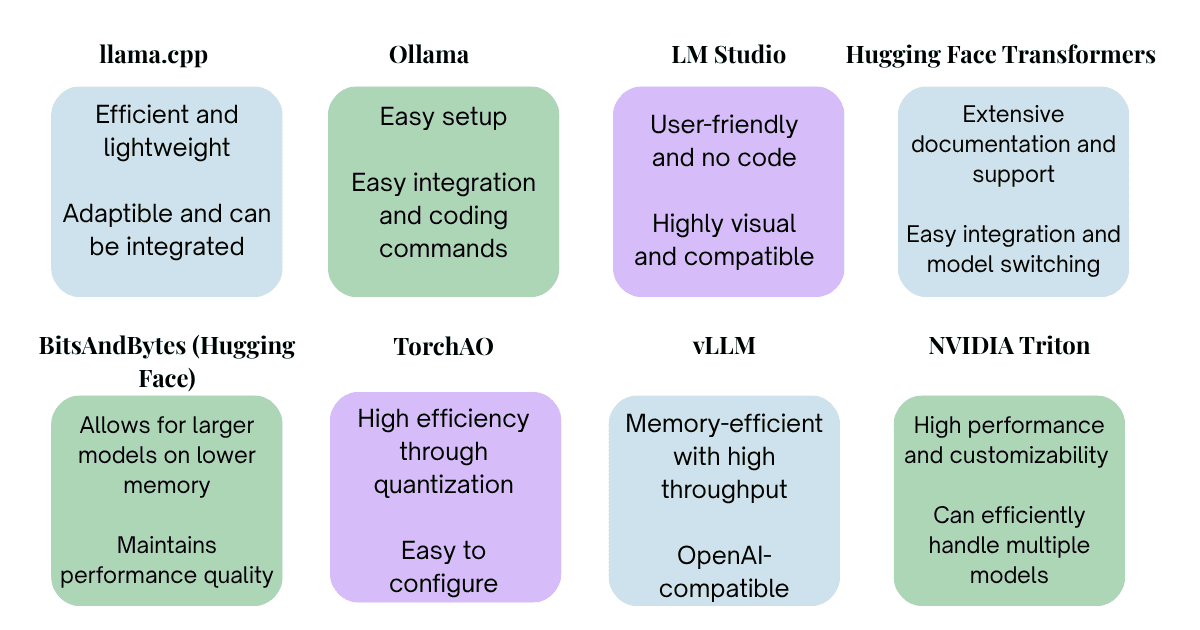 Different local LLM tools serve different purposes. For instance, the Running LLMs Locally Guide presents llama.cpp as a lightweight option for CPUs or GPUs. Ollama simplifies local model management, while LM Studio offers a graphical interface for experimentation. Hugging Face Transformers supports development and customization; BitsAndBytes and TorchAO help compress or optimize models. For higher-volume services, vLLM supports efficient multi-GPU serving, while NVIDIA Triton supports mature production deployments.
The guide suggests approximately 16 GB of system memory as an introductory minimum, with 32 GB or more recommended, and at least 8 GB of GPU memory for acceleration. However, these are not enterprise sizing requirements. Actual needs depend on the model, quantization, context length, concurrent users, response-time expectations, and whether the organization is performing inference, fine-tuning, or both.
Build a Controlled Architecture
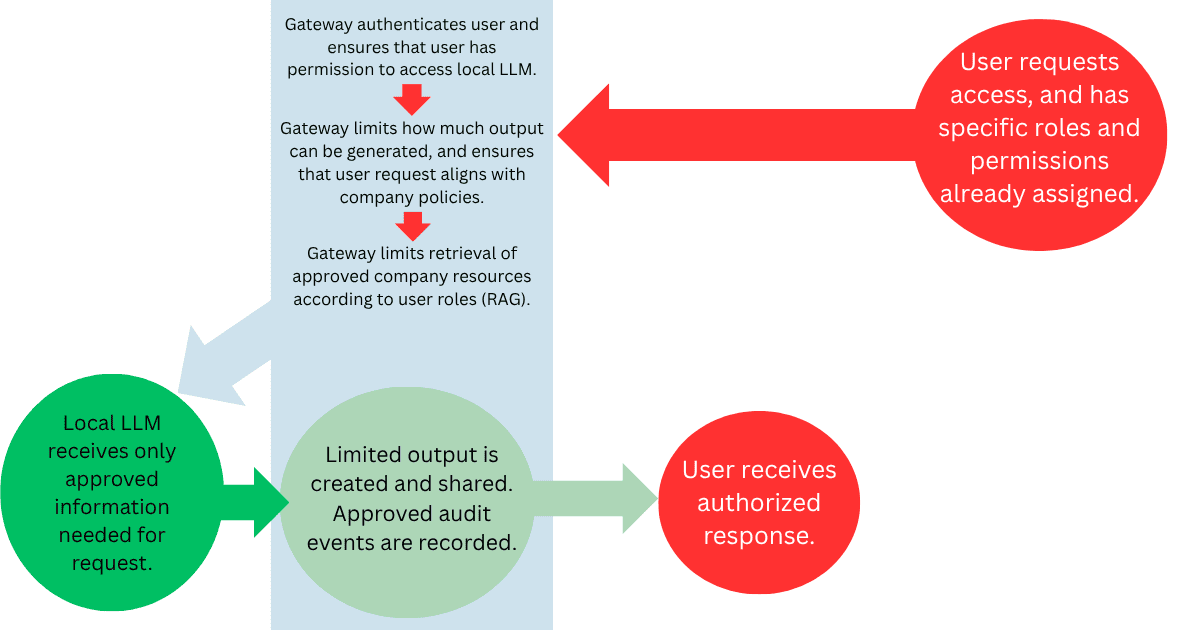 To ensure security, employees generally should not connect directly to the model server. Instead, a controlled internal portal should authenticate users, enforce policies, and create audit records. An AI gateway can apply rate limits, routing, filters, and security rules. Finally, the environment may also include retrieval, evaluation and monitoring systems, a model registry, and backup and recovery.
For many organizations, retrieval-augmented generation, or RAG, will be more appropriate than training on company data. The system searches approved company sources, supplies relevant material to the model, and prepares an answer that can include citations. Information can be updated or removed more easily, and permissions can be applied more precisely.
RAG is especially useful when connecting AI to SAP process documentation, training materials, configuration guidance, or support procedures. However, the AI must not become a route around existing SAP roles or document permissions. For instance, organizations must also protect trusted knowledge collections from outdated, manipulated, or unauthorized content.
The corresponding visual illustrates how an organization may limit data the local LLM provides while incorporating RAG.
Local Hosting Does Not Automatically Create Security
Local deployment can reduce the exposure other solutions face from sending prompts to an external provider. However, prompt injection, incorrect output, data poisoning, insider threats, and model theft remain. With any LLM solution, organizations remain responsible for patching, physical and network security, availability, and disaster recovery.
A poorly protected local server may be less secure than a properly configured enterprise cloud service.
The SANS article identifies four major threats: unauthorized access and model tampering, data poisoning and integrity problems, adversarial manipulation such as prompt injection, and regulatory or compliance gaps. To address these concerns, SANS recommends least-privilege and zero-trust access, protection for prompts and operational data, guardrails and prompt validation, monitoring for unusual activity and behavioral changes, and risk-based governance.
Before deployment, organizations should do the following:
- Maintain a model registry and AI bill of materials
- Begin with noncritical systems
- Centralize oversight
- Develop an AI incident-response plan
Within the actual local LLM structure, organizations should do the following:
- Segment model servers
- Restrict outbound access
- Encrypt data
- Protect credentials
- Apply role-based permissions
All model output should be treated as untrusted, and needs to be validated before reaching another system. Allow lists should limit tools and API use, with human confirmation required for payments, employment decisions, configuration changes, deletion, or other consequential actions. Logging also requires care because conversation records may create another sensitive data repository.
Diving into the Pilot Process
Once a project team understands the nature of a local LLM, the different models available, and best security practices, they are ready to undergo the pilot process.
Organizations should begin with a narrow, internal, and reversible task, such as searching approved policies, summarizing nonconfidential material, or classifying support requests. After classifying the information involved, they should consider whether a local LLM is genuinely the best solution. For instance, an organization may explore enterprise cloud, private cloud, company-hosted, workstation, and hybrid options. A hybrid model may keep sensitive work local while routing approved general tasks to a more capable enterprise service.
After this step is completed, organizations should evaluate models with identical company-specific tasks. They should measure accuracy, source grounding, hallucinations, security behavior, response time, capacity, hardware use, cost, human review time, and license restrictions. Before sensitive use, the organization should test unauthorized access, prompt injection, cross-user leakage, malicious documents, excessive tool use, tampering, resource exhaustion, logging, and investigations.
With any LLM solution, organizations should scale only after quality, security, performance, cost, human-review requirements, incident response, rollback procedures, and long-term ownership are clear. Local LLMs can be valuable, but only when the organization has the infrastructure, staffing, governance, and monitoring capabilities to make that control meaningful.
Stay tuned! In our next article, we will cover AI Infrastructure Planning and Governance, tying together our discussion on selecting the right AI platforms and implementing local LLMs.




Leave A Comment